








Mileage reports done and dusted in a few clicks.
What it is
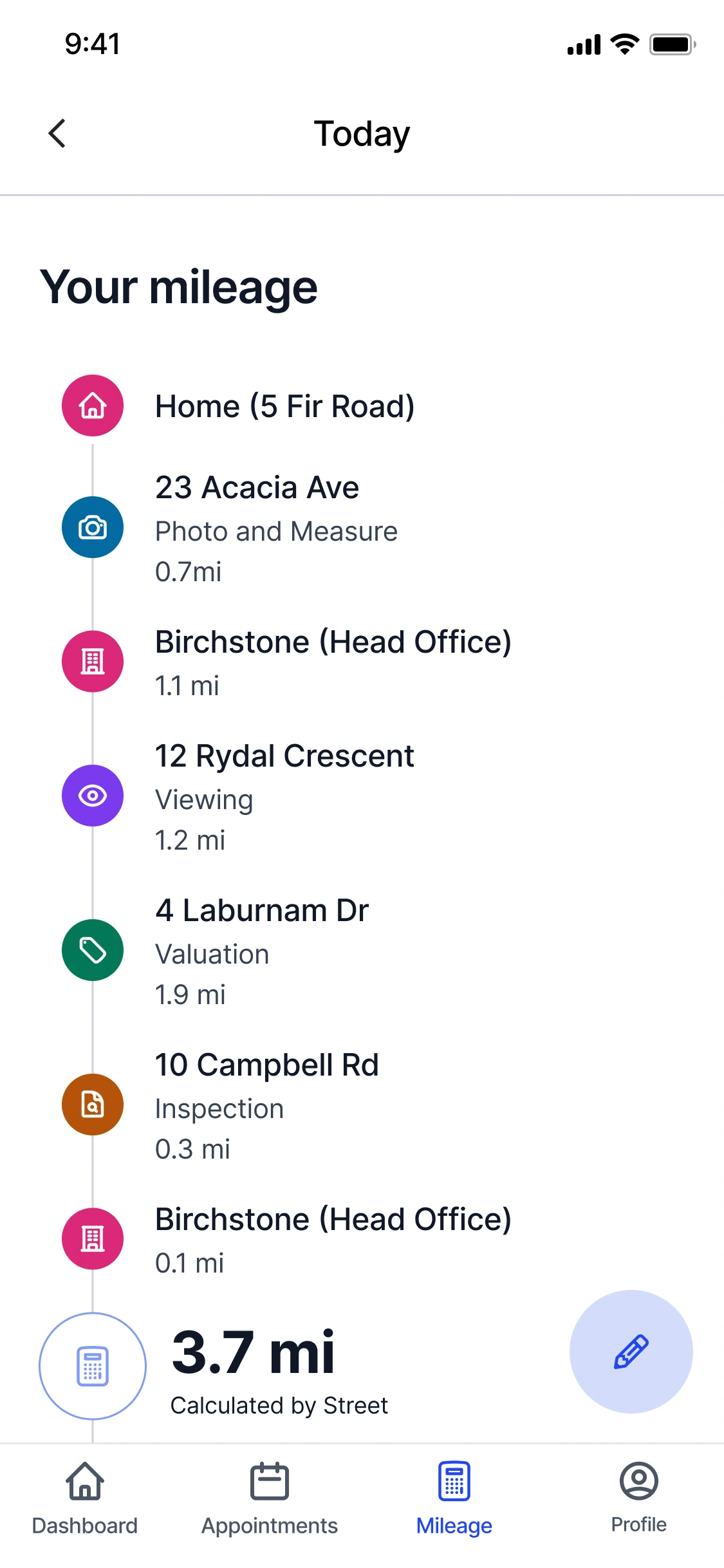
Your daily mileage is worked out from the appointments already in your diary, with the shortest available route mapped between each stop. Review the day in the Agent App, edit anything that didn't go to plan, and submit when you're ready. No GPS, no spreadsheets, no chasing up at month end.
Who benefits
Agent. Each day's route is ready for you to review, tweak, and submit straight from the Agent App. Once approved, it feeds the Mileage Breakdown report for payroll.
Company Admin. Set the default expense per mile in Settings to apply across the team. Agents on a different arrangement can save their own rate in their profile.
Branch Manager. Review submissions, approve or send them back with a note, and export the Mileage Breakdown to CSV when payroll or accounting needs it.
Mileage calculated from your diary, ready in a few taps.
Each day's route mapped from your appointments, then reviewed, edited, and submitted inside the Agent App.

Zero
Manual entries. Every day's route is mapped from your diary.
1 Tap
To submit a day for approval once you're happy with it.
CSV
Mileage Breakdown report, ready for payroll or accounting.
Agents lose hours piecing mileage together from memory, and finance chases missing claims at month end. Street works backwards from the diary and builds each day's route for you, ready to review, edit, and submit in the app.
Mileage reports that run themselves, month after month.
Your diary becomes your mileage log. Agents check each day in a few taps, managers approve, and the Mileage Breakdown exports straight to CSV for payroll.

Every day's route, worked out from the appointments you've already booked.
The Agent App takes each appointment in your diary and maps the shortest available route between every stop, giving you a ready-made mileage total for the day. Nothing runs in the background, and your phone isn't pinging Street with your location. If a day didn't follow the diary exactly, say you finished at home instead of the office or added a last-minute visit, you can edit the route in seconds.
- Built from the diary: Your appointments decide your stops, and the shortest available route is mapped between them.
- No GPS, no location tracking: Mileage comes from where you said you'd be, not from a background signal on your phone.
- Editable before you submit: Add a stop, remove one, or reorder the route. Search any address, or use the quick-add button for your office.
- A record you can stand behind: Each submitted day is stored against your profile with its route, distance, and approval history.

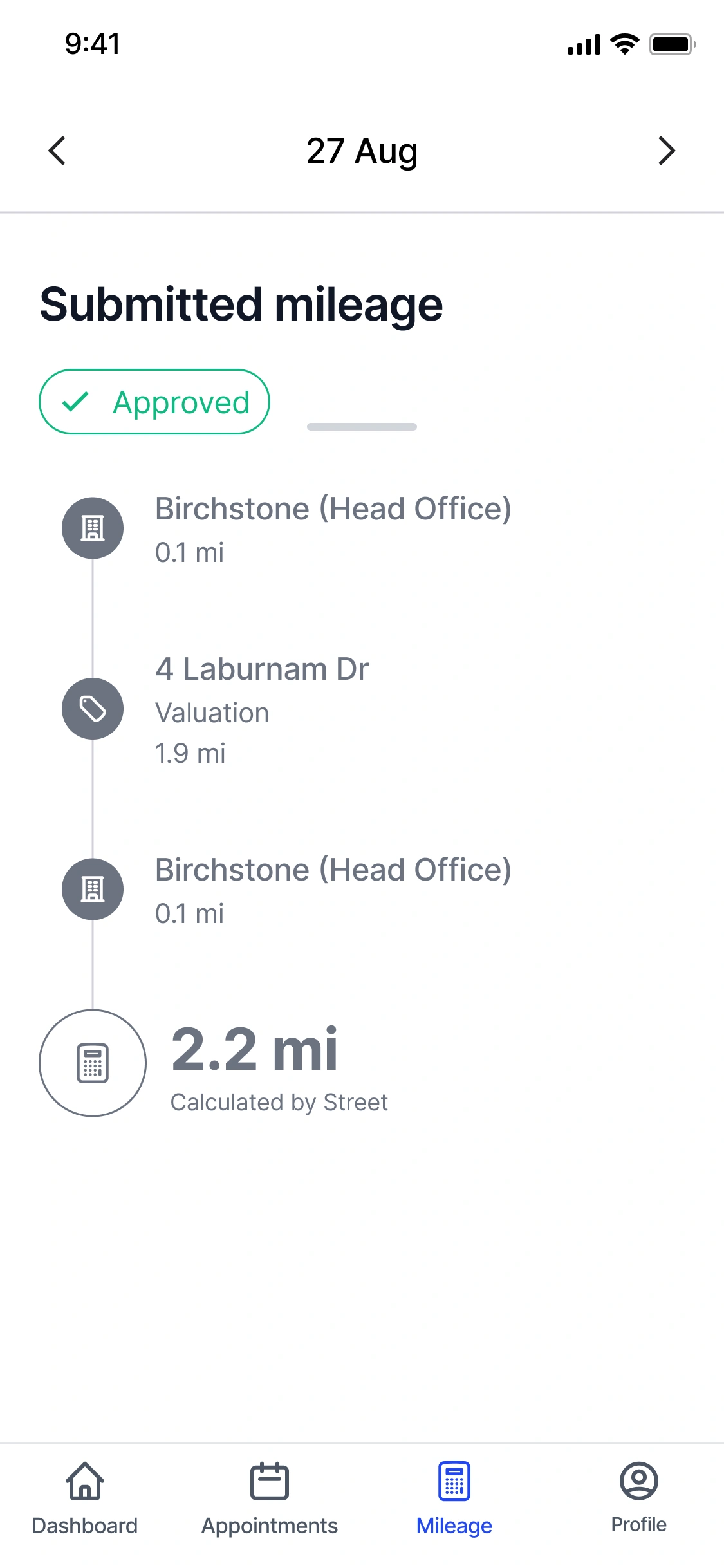
Submit when you're ready, not when the month ends.
Once a day looks right, submit it for approval. The claim moves to "Awaiting Approval" and lands with your branch or company admin, who can approve it or send it back with a comment. Approved days are locked against further editing and roll into the Mileage Breakdown report. The rate applied to each claim is whatever your Company Admin has set in Settings as the default expense per mile, or the custom rate saved in your own profile if you've been given a different arrangement.
- Submit day by day: There's no month-end rush. Review and send a day as soon as you've looked it over.
- Clear approval status: Each day shows where it is: draft, awaiting approval, or approved and locked.
- Your rate, or the company rate: A Company Admin sets the default in Settings. Agents on a different rate override it in their own profile.
- Edits stay open until approval: Spot a missing stop after submitting? You can still edit, right up until a manager signs the day off.

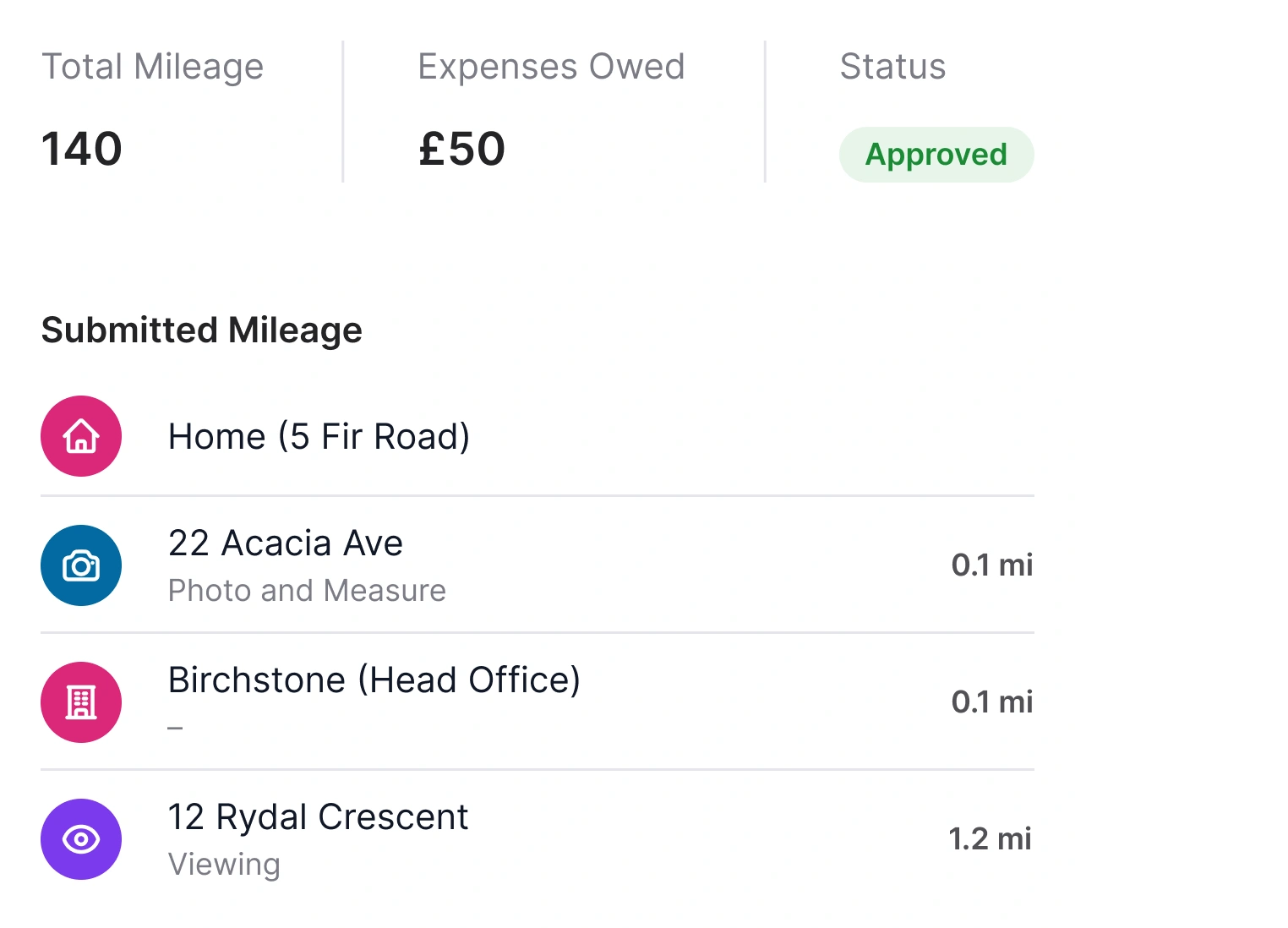
One report, ready to hand to payroll.
Every approved submission feeds into the Mileage Breakdown report. Filter by agent or by date, drill into any day to see the route and distance behind the claim, and export the lot to CSV when it's time for payroll or accounting. The report only shows mileage that's been approved, so the numbers you send are the numbers that get paid.
- Filter by agent or date: Pull a single agent's month, or the whole team's quarter, whichever you need.
- Approved claims only: Only mileage that's been signed off shows in the report, so the totals are final.
- Drill into any day: Open a claim to see the route, distance, and rate applied, plus the agent who submitted it.
- Export to CSV: Send the Mileage Breakdown straight into payroll or your accounting software.
"Reporting suddenly became an awful lot easier for our payroll team. Now the diary management automatically tracks staff mileage and appointments that have been booked on."
Maria Morgan-Geen, Managing Director, Platinum Properties
Frequently asked questions
The Street Agent App calculates your daily mileage from the appointments in your diary. It maps the shortest available route between each stop, it doesn't track your location via GPS. You can review each day's mileage in the app and edit your route if needed, for example if you ended at home instead of the office or made an extra stop along the way.
Yes. Tap the edit icon to add stops, remove stops, or reorder your route. You can search for an address manually or use the quick-add button to drop in your office location. You can keep editing right up until a manager approves the submission.
Your Company Admin sets a default expense per mile in Settings, which applies to everyone. If you need a different rate, you can set a custom amount in your own profile settings, this overrides the company default. Speak to your admin if you're unsure which rate applies to you.
Your mileage moves to "Awaiting Approval." A branch or company admin reviews and approves it. Once approved, the submission is locked and appears in the Mileage Breakdown report, which can be exported to CSV for payroll or accounting.