








Window cards
What it is
Window card generation from a single property record. Select a template, edit photos and text, and save a print-ready PDF, stored against the property and ready to share instantly.
Who benefits
Marketing manager. Generate window cards instantly from any property page. Templates carry your branding automatically, with no design software and no external designers.
Branch manager. Window cards are ready within minutes of a property going live. Download for print, share via public link, or make available on your website. New cards start from the last saved version automatically.
0 steps
To set up branding. Templates configured once, applied automatically.
100%
Of cards stored in the property's documents, accessible any time.
1 click
To download as a PDF or copy a public link.
Stale window cards cost you credibility. Current ones reinforce it.
From property record to print-ready window card in minutes.
Your property details are already in Street. Select a template, swap photos, edit the text, and save. Everything flows from one property record, with no separate design tool and no reformatting from scratch.

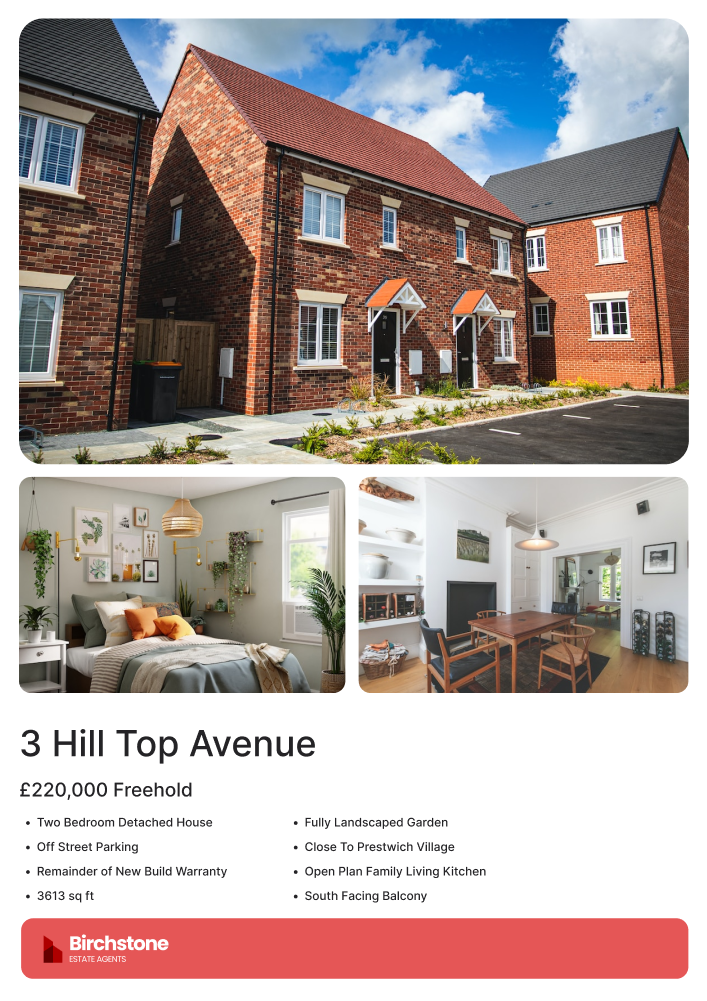
One property. One template. Card ready in seconds.
Select a template from your branch settings. Photos and written content load from the property record. Edit what you need, swap images, update text, adjust formatting. Save to the property's documents. Download as a PDF for printing or copy a public link to share online or embed on your website. Price changed? Generate a new card using the same template and Street uses your last version as the starting point, so you only change what is different.
- PDF or shareable link: Download for print or copy a public link to share online and embed on your website.
- Branded templates: Configured once in branch settings. Agency colours, fonts, and layout built into every card automatically.
- Editable content: Click any photo or text to make changes directly in the editor before saving.
- Easy updates: Generate a new card using the same template and Street starts from your last saved version automatically.
RELATED FEATURES
Frequently asked questions
Yes. Once you select a template, click any photo to swap it from the property's uploaded images, or click any text to edit the wording, formatting, and font colour. Changes apply before you save.
Window cards are saved as a PDF, ready to download and print. You can also copy a public shareable link to embed on your website or send via email. The shareable link is only available if the "make available on website" setting is enabled.
No. Window cards are stored in the property's documents and files and remain there regardless of the property's status. You can access, download, or delete them at any time from the property page.